If you use Squarespace and you want to increase your visibility in Search Engines and AI, there are a few simple tactics that I recommend to just about every client before we start considering hiring an SEO agency or Squarespace SEO specialist.
Most visibility issues come from missing some basic things. The same basics that help Google understand your site can also help AI crawlers summarize and reuse your content accurately.
Below are the five of the main things I recommend every time because they’re:
Easy to do by yourself
Low risk and typically can’t “hurt” your current ranking status.
Built into the Squarespace Editor
Helpful across almost every type of site
No plugins. No paid tools. No cost.
TL;DR:The short version
If you only do five things to improve your Squarespace SEO, focus on these basics:
Connect your site to Google Search Console so you know pages are being crawled and indexed
Write meaningful alt text that describes images clearly and naturally
Standardize page titles so your business name and location are consistent across the site
Add FAQs anywhere people tend to ask the same questions
Link related pages together intentionally within your content
None of this is advanced SEO or technical work or even Squarespace specific. These steps are about reducing ambiguity. When your pages are clear, structured, and connected, search engines and AI systems don’t have to guess what your site is about or how the content fits together.
1. Connect your site to Google Search Console
This is the easiest win, and the one most people skip. If your site isn’t connected to Google Search Console, you don’t actually know which pages are indexed, which pages have problems being indexed, and whether Google can crawl your site consistently or if it’s having problems doing so.
Why This Matters
Search engines and AI systems both rely on indexed pages. If a page isn’t indexed, as far as they’re concerned it doesn’t exist.
How to set it up:
Go to https://search.google.com/search-console/about and create an account or sign in.
Follow the steps to verify your site and connect your domain.
Submit the Squarespace sitemap, they will always be the same format and end with sitemap.xml - https://yourwebsitedomain.com/sitemap.xml
Check it occasionally for errors or warnings
That alone catches a surprising number of issues as well as shows you what kinds of search terms are actually showing your website in the results.
2. Use alt text that actually describes the image (and your context)
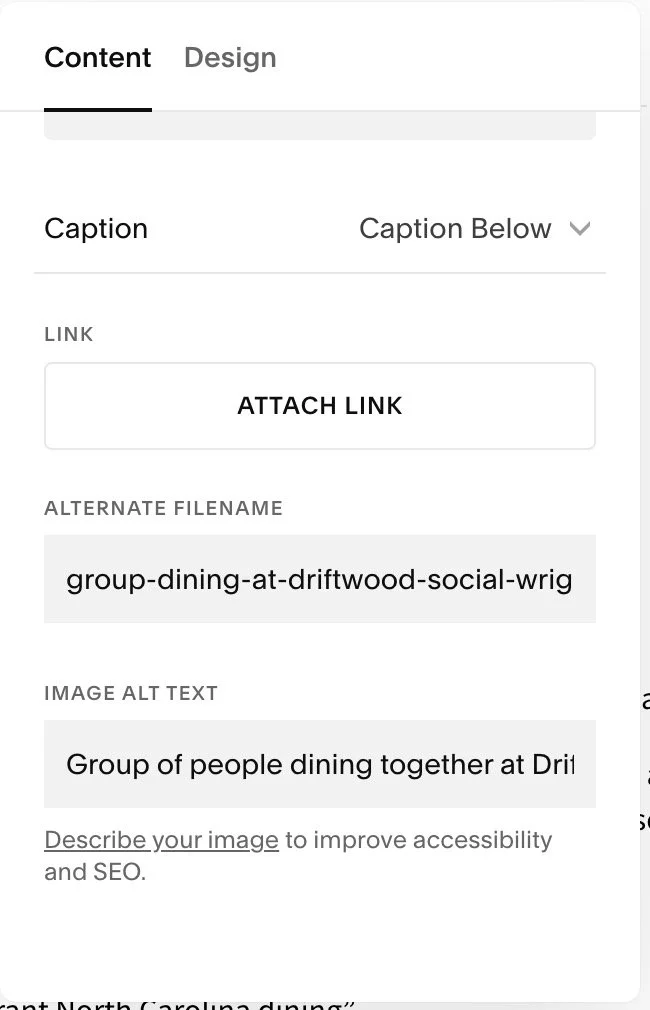
Alt text is one of the most overlooked SEO fields in Squarespace and websites in general. It’s also a requirement to keep your site accessible however it’s not just for accessibility. Alt text is also one of the few places where describing what’s happening naturally includes keywords without stuffing.
Good example
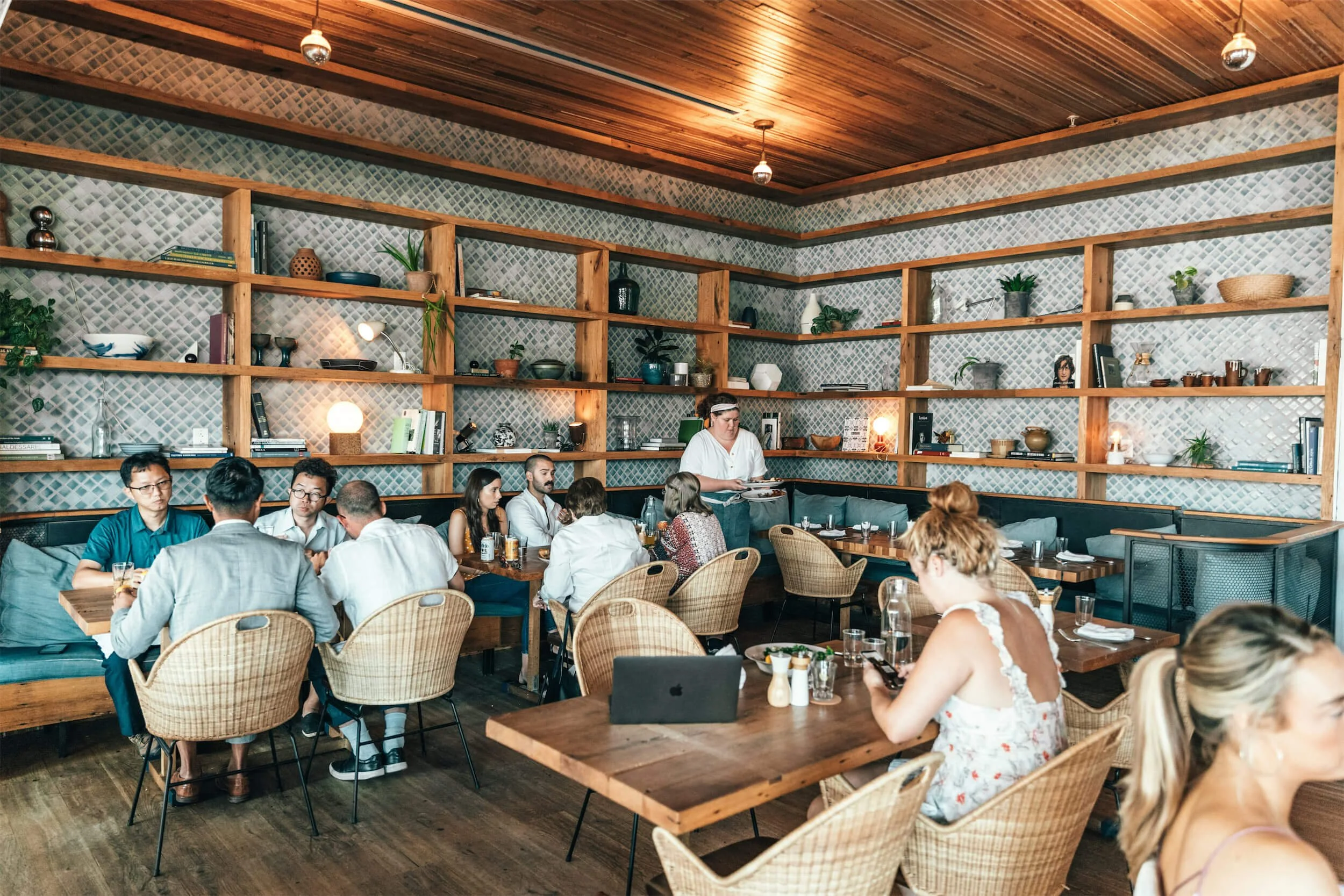
“Group of people dining together at Driftwood Social, a coastal neighborhood restaurant and bar in Wrightsville Beach, North Carolina”
That description explains what’s actually happening in the image, includes the business name, and avoids keyword stuffing while still giving search engines and AI systems enough information to understand what the image represents.
Not great
“restaurant bar Wrightsville Beach best restaurant North Carolina dining”
This doesn’t describe the image at all. It’s just a list of keywords with no visual meaning, which makes it unhelpful for users and easy for search engines to ignore.
Why this matters
Search engines and AI systems can’t infer meaning from images alone. They rely on alt text to understand what an image shows, how it relates to the page, and whether it’s relevant to a search or summary. Clear, descriptive alt text makes your images usable instead of invisible.
Rule of thumb
Write alt text like you’re explaining the image to someone who can’t see it.
If the business name or location helps clarify what’s happening, include it.
If it doesn’t, leave it out.
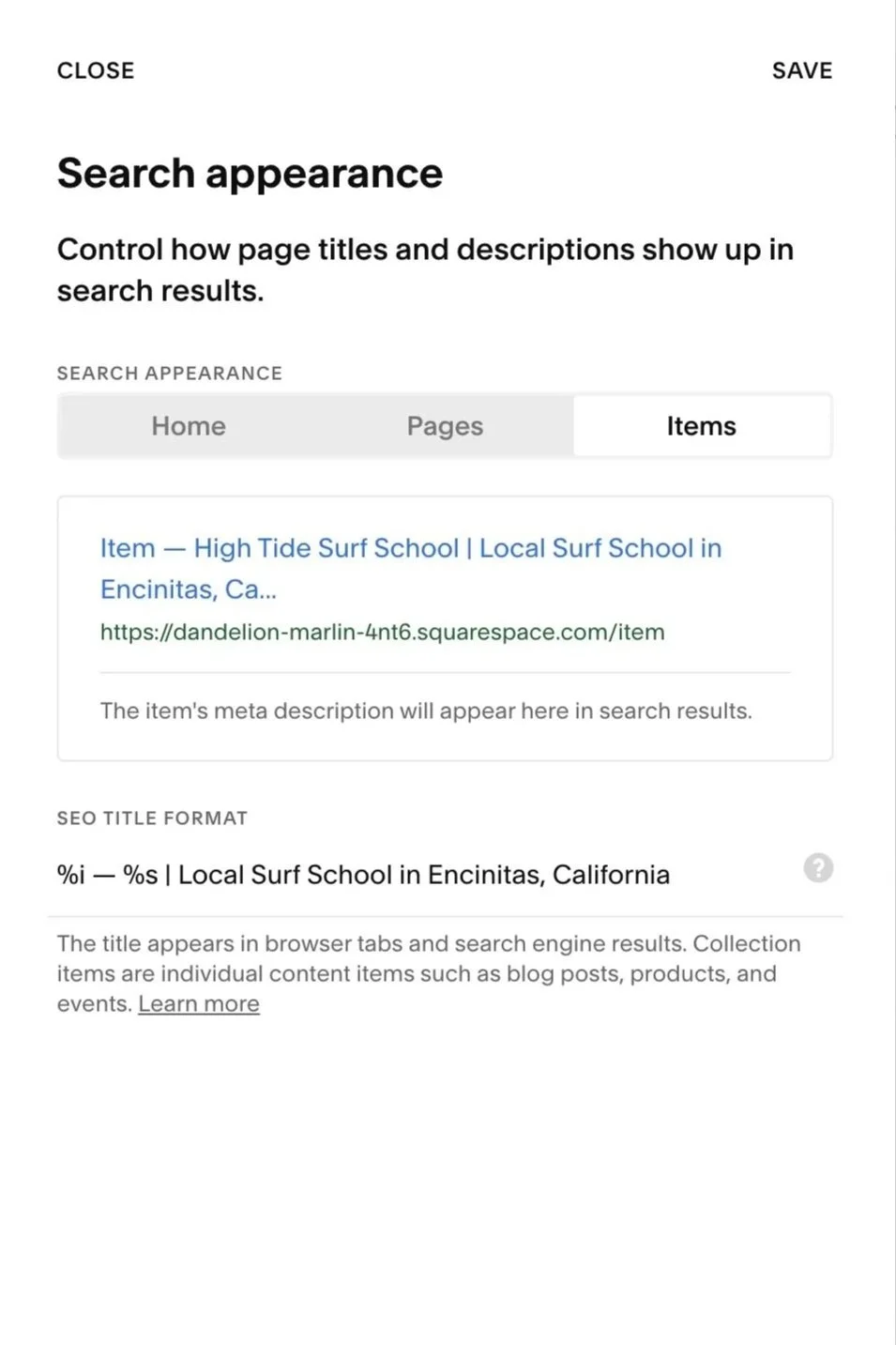
3. Add a consistent tag to the end of your page titles
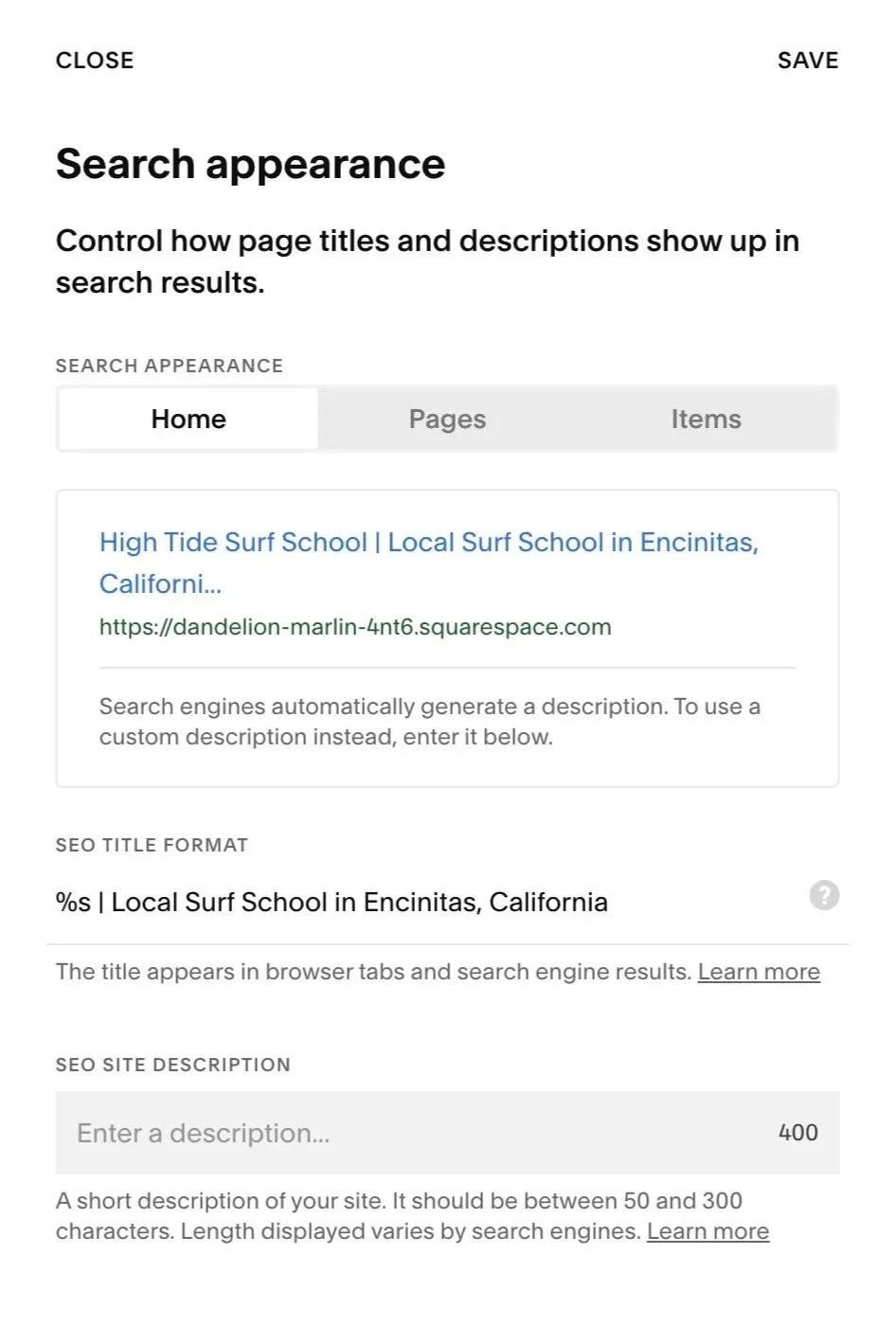
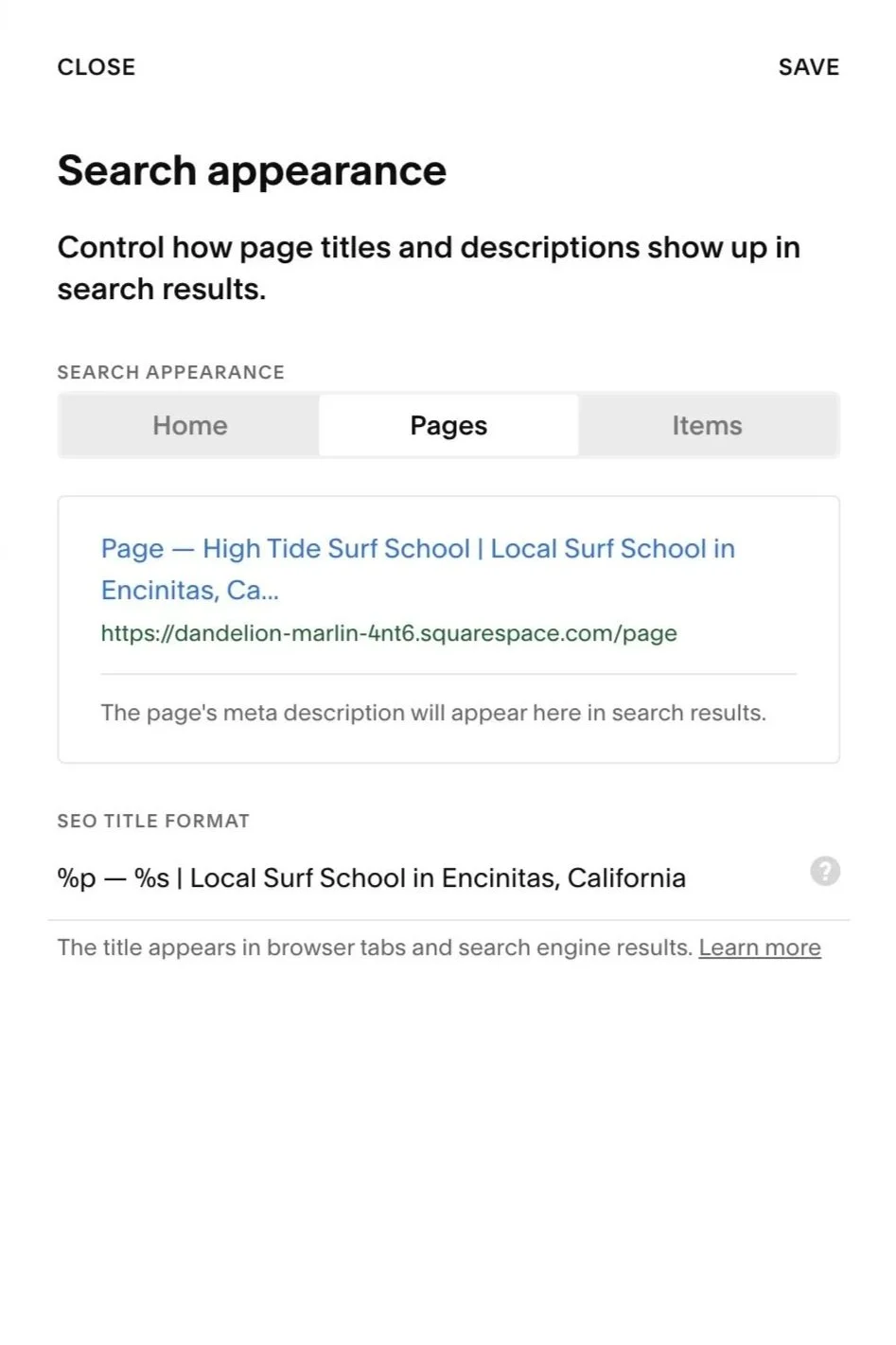
This is a simple branding and SEO move that works especially well for local or niche sites. Squarespace gives you full control over page titles, and those titles carry a lot of weight. They help search engines understand what a page is about and help AI systems associate that page with the correct business and location.
For example, instead of using a vague title like:
“Surf School”
You could use something more specific and consistent, such as:
“| Surf Lessons in Encinitas, California”
This keeps the main topic of the page front and center, while also reinforcing who the site belongs to and where it’s located. I personally like the use “|” in between the info that Squarespace adds in.
Why this works
The page still targets its primary topic clearly
The site name and location are reinforced naturally
Search engines see consistent signals across multiple pages
AI systems get clearer attribution when summarizing or referencing the page
What I usually recommend is keeping the main page topic first, then adding the site name or location after a pipe character. Use the same format across most of your important pages so the context stays consistent. This isn’t keyword stuffing. It’s just making your page titles clearer and more informative.
4. Use FAQs strategically (on pages and site-wide)
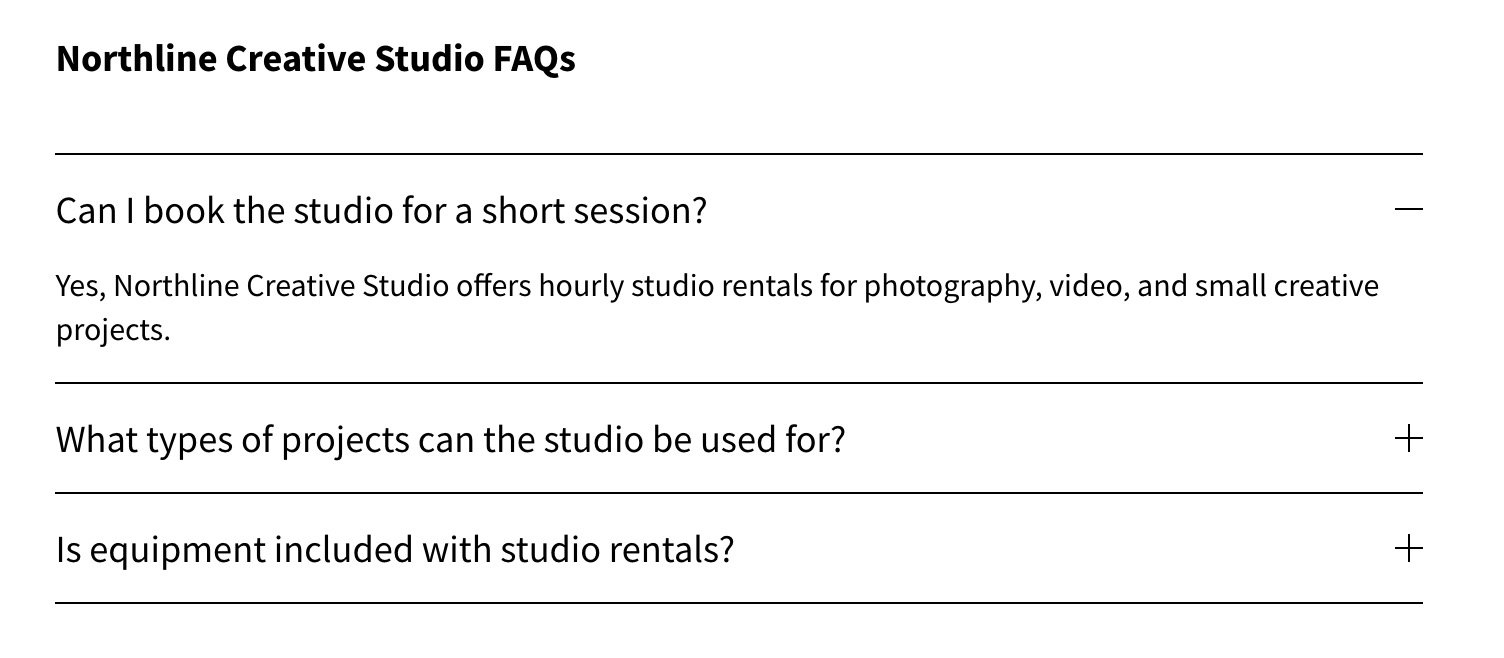
FAQs are one of the most efficient content formats for both SEO and AI because they mirror how people actually search and ask questions. They create clear question-and-answer pairs that are easy to scan, easy to understand, and easy for search engines and AI systems to pull meaning from without guessing. When answers are written plainly and sit close to the question, systems can clearly identify where an answer starts and ends. That makes this content far more reusable in search results, featured snippets, and AI-generated summaries.
In Squarespace, FAQs are most commonly presented using accordion blocks, which is completely fine. As long as the question and answer are present in the page content and not injected later with scripts, search engines can still read them. The key is keeping each question focused and each answer direct, not buried in long paragraphs.
Where to use them
• On your home page
• On important service or product pages
• On blog posts where questions naturally come up
• On a single, dedicated FAQ page
Example using a fake business called “Northline Creative Studio”.
Why this matters
AI systems often reuse direct answers verbatim. FAQs make it obvious where answers begin and end, which reduces ambiguity and increases the chances your content is reused accurately.
5. Add internal links inside real content
Your site’s main navigation (the links in the header or footer) is important, but it’s only one type of link. Links that appear inside the actual page content serve a different purpose and send stronger signals.
When you link to other pages from within FAQs, paragraphs, or blog posts, you’re not just helping users move around the site. You’re also helping search engines discover and crawl pages more reliably. Crawlers follow links, and pages that are referenced naturally inside content are more likely to be found, revisited, and understood in context than pages that only exist in menus or sitemaps.
For example, inside an FAQ you might say, “For private events, see our Private Parties page.” Inside a blog post, you could write, “If you’re planning a visit, check out our park rules.” These links live inside real sentences, which makes it clear why the pages are related.
Why this matters
Links placed inside content help search engines and AI systems:
Discover and crawl pages more consistently
Understand which pages are important in context
See how topics and pages relate naturally
Identify where deeper or supporting information lives
Best practices
Use your main navigation to help people find pages, but use in-content links to explain how those pages relate and to reinforce which ones matter.
Final thoughts
None of these Squarespace SEO suggestions are advanced, and that’s the point. Visibility issues on Squarespace are rarely caused by missing tricks or hidden settings. They’re usually caused by unclear signals.
When your pages clearly say what they’re about, when images are described instead of ignored, when questions are answered directly, and when content is linked together thoughtfully, search engines and AI systems don’t have to guess. They can crawl your site more reliably, understand relationships between pages, and reuse your content more accurately.
You don’t need to do everything at once. Even small improvements in clarity add up over time. The goal isn’t to outsmart algorithms. It’s to make your site easier to understand for anything that reads it, human or otherwise.
FAQs
-
Yes. You can handle many basic Squarespace SEO improvements yourself, including connecting Google Search Console, writing better page titles, adding alt text, using FAQs, and linking related pages together. More advanced SEO work may still require help, but these basics are a good place to start.
-
Squarespace can work well for SEO when the site is set up clearly. The biggest issue is usually not the platform itself, but missing page titles, weak content, poor image descriptions, thin pages, or pages that are not connected well through internal links.
-
Yes. FAQs help because they match the way people actually search and ask questions. A clear question followed by a direct answer makes it easier for search engines and AI tools to understand, summarize, and reuse your content accurately.
-
You should add useful alt text to important images, especially images that support the content of the page. The goal is to describe what the image shows in a natural way. Decorative images do not need keyword-heavy alt text, and stuffing keywords into every image can make the site feel less helpful.
-
SEO changes usually take time. Some pages may be crawled or updated in search results quickly, while others can take days or weeks. Connecting your site to Google Search Console helps you see whether Google is finding and indexing your pages.